Sans Bold
Best for: everyday posts
𝗗𝗶𝘀𝗰𝗼𝗿𝗱 𝗩𝗶𝗯𝗲𝘀
Use this Discord font generator to copy and paste stylish Unicode text for display names, server nicknames, bios, server names, channel names, and roles.
Pick a style for your Discord display name, server nickname, bio, channel name, or role label.
Click any result to copy it. These Discord-ready styles are filtered by your selected group so you can find a readable fit faster.
Sans Bold
Best for: everyday posts
𝗗𝗶𝘀𝗰𝗼𝗿𝗱 𝗩𝗶𝗯𝗲𝘀
Bold Serif
Best for: everyday posts
𝐃𝐢𝐬𝐜𝐨𝐫𝐝 𝐕𝐢𝐛𝐞𝐬
Sans Bold Italic
Best for: headlines
𝘿𝙞𝙨𝙘𝙤𝙧𝙙 𝙑𝙞𝙗𝙚𝙨
Bold Italic
Best for: everyday posts
𝑫𝒊𝒔𝒄𝒐𝒓𝒅 𝑽𝒊𝒃𝒆𝒔
Double Struck
Best for: everyday posts
𝔻𝕚𝕤𝕔𝕠𝕣𝕕 𝕍𝕚𝕓𝕖𝕤
Monospace
Best for: discord names
𝙳𝚒𝚜𝚌𝚘𝚛𝚍 𝚅𝚒𝚋𝚎𝚜
Plain
Best for: everyday posts
Discord Vibes
Italic Serif
Best for: everyday posts
𝐷𝑖𝑠𝑐𝑜𝑟𝑑 𝑉𝑖𝑏𝑒𝑠
Script
Best for: everyday posts
𝒟𝒾𝓈𝒸ℴ𝓇𝒹 𝒱𝒾𝒷ℯ𝓈
Bold Script
Best for: everyday posts
𝓓𝓲𝓼𝓬𝓸𝓻𝓭 𝓥𝓲𝓫𝓮𝓼
Fraktur
Best for: everyday posts
𝔇𝔦𝔰𝔠𝔬𝔯𝔡 𝔙𝔦𝔟𝔢𝔰
Bold Fraktur
Best for: everyday posts
𝕯𝖎𝖘𝖈𝖔𝖗𝖉 𝖁𝖎𝖇𝖊𝖘
Most people searching for a font generator for Discord want to know where styled text actually works. Here are the best places to use it.
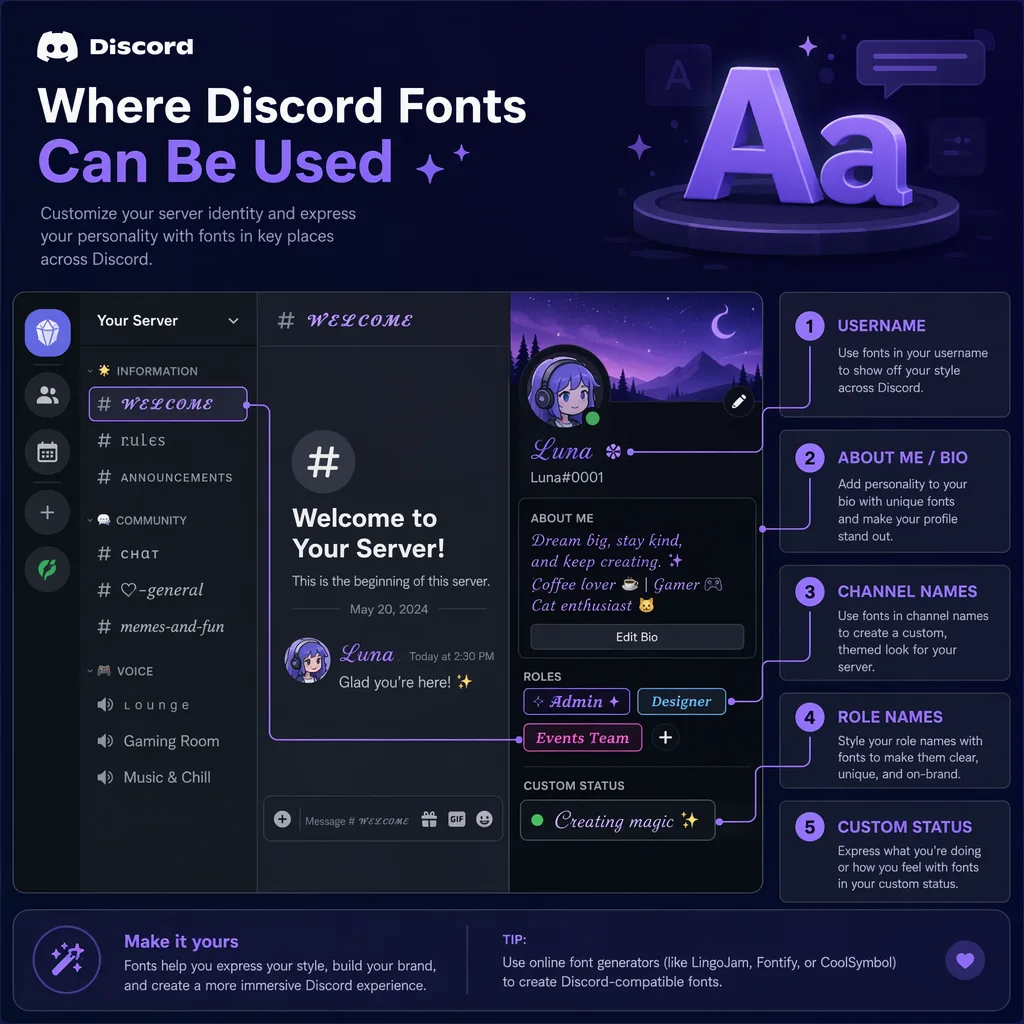
The best fit for a Discord name font generator. Bold, clean styles like Sans Bold, Double Struck, and Fraktur stand out while staying readable in profiles and member lists.
Per-server nicknames give you more room to experiment. Try cursive, playful, or gothic styles when you want each server to have its own identity.
Discord supports Unicode in About Me, so short decorative lines work well here. Script, small caps, and light decorative styles are usually easiest to read.
Use cleaner styles for text channels and categories, then add more playful or decorative styles to role names where a little flair helps without hurting readability.
Your server name is your first impression. Bold serif, clean sans, and gothic-inspired styles work best when the text stays short enough to scan quickly.
Short status lines are perfect for styled Unicode text. A compact status like 🎧 𝐥𝐨𝐬𝐭 𝐢𝐧 𝐦𝐞𝐥𝐨𝐝𝐢𝐞𝐬 adds personality without becoming hard to read.
Each style category fits a different Discord use case, from readable display names to decorative bio lines and gaming server branding.
| Style | Visual feel | Best use | Readability | Typical intent |
|---|---|---|---|---|
| Bold & Clean | Strong, scannable, clear | Display names, server names, roles, channel titles | High | Professional, readable Discord branding |
| Stylish & Cursive | Elegant, flowing, artistic | Bios, about me, display names, status | Medium to high | Creative profiles and aesthetic bios |
| Fun & Playful | Bubbly, cute, decorative | Nicknames, roles, fun channels, emoji lines | Medium | Casual servers and playful communities |
| Edgy & Gothic | Dark, bold, dramatic | Gaming clans, dark themes, clan tags | Medium | Gaming communities and dark aesthetics |
No downloads, no sign-ups, and nothing to install.
This generator uses Unicode characters rather than installed font files, so the text renders natively across Discord on desktop, mobile, and web. If you want a Discord name font generator, start with display names and nicknames because Discord usernames have stricter character rules.
Yes. Here is how different Discord surfaces handle styled Unicode text.
This is the best place to use styled Discord fonts. Clean bold, script, and gothic Unicode styles usually display well across desktop, mobile, and web.
One of the best places to experiment. If the server lets you change your nickname, you can use a different styled name in each community.
About Me supports up to 190 characters and accepts Unicode. Cursive, small caps, and lightly decorative styles work well for short profile lines.
Bold styles keep channels scannable. Avoid overly decorative fonts that may be hard to read in the channel list.
Short and readable is key. Bold Sans and circled styles are popular for role names.
Most Unicode works in chat. Use moderately — long styled paragraphs can be harder to read than plain text.
Very short text only. A styled emoji + word combo like 🎮 𝐩𝐥𝐚𝐲𝐢𝐧𝐠 adds flair.
Discord usernames follow stricter rules than display names, so many decorative Unicode styles will not fit there. Use this generator mainly for display names, nicknames, bios, and server text.
Use these examples for faster inspiration when you need a Discord display name, server nickname, bio line, or role label.
Common questions about using a Discord fonts generator for names, bios, channels, roles, and chat.
Type your text in the input box above, choose a style you like, click the copy button, and paste it into your Discord display name, server nickname, bio, channel name, role name, or chat message.
They are Unicode characters, not installed font files. That's why they work as copy-and-paste text across Discord and other modern apps without any plugins.
Usually, styled Discord text works best in display names, server nicknames, bios, channel names, role names, and chat. Discord usernames are unique account handles with stricter character rules, so many decorative styles will not work there.
Sans Bold, Double Struck, Bold Serif, and readable Fraktur styles are the safest picks for display names. They stand out without becoming hard to read in member lists and profile cards.
Some Unicode characters are less widely supported than others. If you see blank boxes or broken characters, switch to a simpler style such as Sans Bold, Double Struck, Monospace, or Script.
Discord's About Me section supports up to 190 characters, including emojis, markdown, links, and Unicode characters. Shorter styled lines usually stay the most readable.
Yes, you can paste styled text into chat messages. Most Unicode styles display correctly, but avoid long paragraphs of decorative text for readability.
Most common Unicode-based styles work on both desktop and mobile Discord apps, including iOS and Android. If a style looks broken on your device, switch to a simpler option like Sans Bold, Double Struck, or Monospace.
If you like Discord font styles, you might also enjoy these related font generators.
Platform-specific font generators for your favorite social apps.